This week is the final week I am working on the fundamental tasks with creating something that follows the player (only problem can’t be seen when playing as it’s always behind the player but it is following). A function that moves actors to and from pre-set locations through portals between the 2 platforms. Finally something that resets the world state through a reset button beyond the locked door.
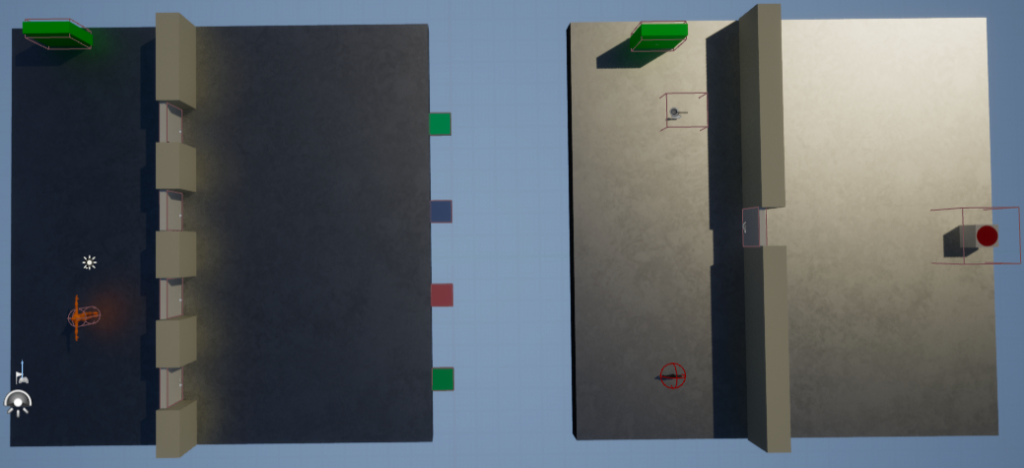
This is an overview of the final version of the level at the end of the week still keeping it basic as their doesn’t need to be much of a level design for these mechanics. This shows the portals on each of the platforms (green walls), the player model would be what is following the player (when the level is player it teleports behind the player it is never visible during gameplay) and the reset button.

This gif shows the portals working both ways as can be seen in the gif I walk a little away before going back to the portal. This is as I have found that turning around instantly to try and go back doesn’t work as you are within the overlap of the portal (the box collision) which as it teleports from a begin overlap it doesn’t teleport.
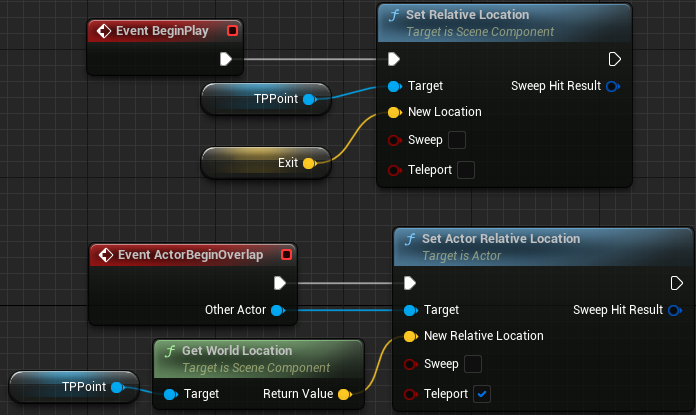
This is the blueprint for the portal when on the beginning of play the portal will set the relative location of the TP (teleport) point to the exit location of the portal (shown below). Now for teleporting the player when the player begins overlapping the portal then it sets the relative location of the player to the world location of the TP point (where the exit is). While it is actor begin overlap so could work with any other actor it doesn’t work with the bullets and fireballs as when they overlap with something the get destroyed so just causes an errors. As there are no other actors that could be put through the portal that doesn’t cause any issues anyway.

As can be seen in the example above the portal exit is similar to how the moving platforms were where for a portal in the world you can drag out and put the exit portal anyway. In this case I put it in front of the other portal as I’m going for the effect of 2 linked up portals.

This gif shows the reset button where when pressed (same input as for equip so the ‘E’ key) the level is reset.
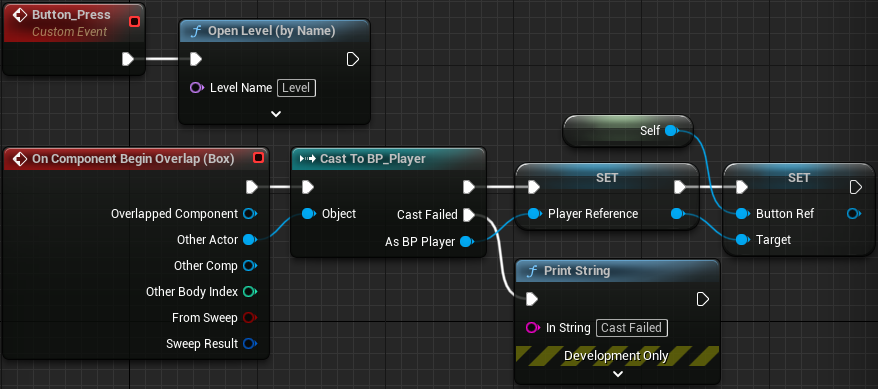
This is the blueprint for the reset button in which is the button press event (called within player when the equip key bind is pressed) which the opens the level by name Level (the name of the level being played). It also has the on component begin overlap with the player in which it casts to the player and sets the player to player reference and sets the button reference in player to self (as this is in the reset button blueprint self is a reference to the button).
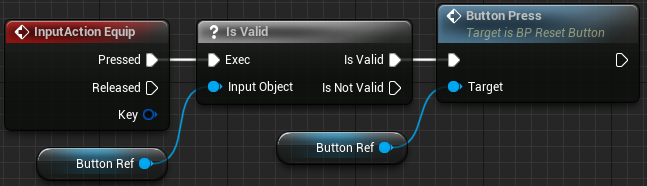
This is the related blueprint in the player where when the equip action is pressed and is valid from the button reference (passed when overlapping the button) it calls the event of button press in the button blueprint.


The above images show the player and the follower although the follower is never visible during gameplay (as they are always behind the player it’s impossible to turn around and see it) it is always behind the player (by 200 units). I also realized when taking these images that it also slightly hovers above the ground at times.
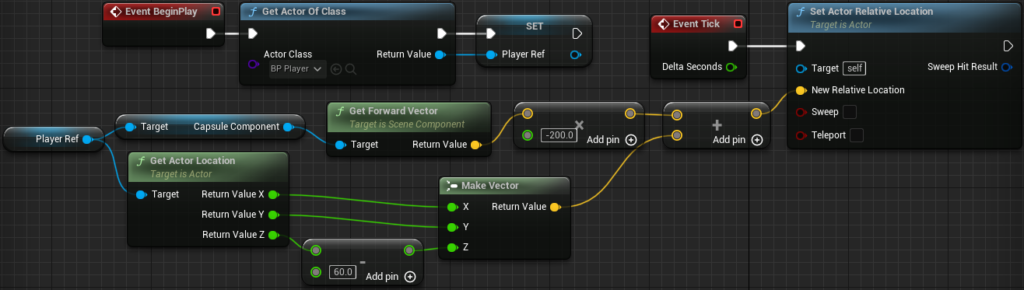
This is the blueprint of the follower in which first when beginning play it gets the actor of the player class (the player) and sets that to player ref (player reference). Then every tick it sets the actors relative location (of the follower) based on the forward vector of the player multiplied by -200 added to the players location (with the Z location having 60 taking away from it) turned it to a vector.