Day 1- Morning
Firstly I started of with changing the enemy AI to use navigation invokers to decrease the performance hit that would come with having a large nav mesh with a lot of enemies path finding constantly.
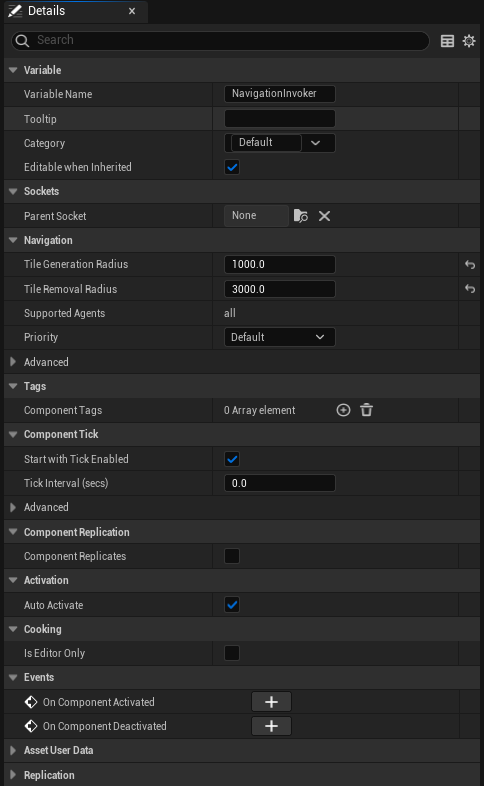
Firstly these are the settings for the navigation invoker which only really relevant changes are the generation radius of 1000 and removal radius of 3000 which represents how far around the enemy tiles are generated and how far away the enemy has to move out of radius to start removing tiles.

This is the project settings for the navigation system where because I’m now using navigation invokers I have enabled generate navigation only around navigation invokers and set the active tiles update interval to 0.4 seconds.
https://blueprintue.com/blueprint/nb18xqce
This shows the changes to the free roam logic of the enemy first change being checking if movement is enabled which is related to the activate and deactivate of the nav invoker events (more on them later).
The next changes is when movement is disabled at which point it calls activate nav invoker (calling it evoker is a typo it does get updated later just a minor detail) with a delay then calling free roam.
The next change is after the ai move to node where now both on the success and failure calls top deactivate the nav invoker then calling back to free roam.
https://blueprintue.com/blueprint/it1hln7d
This is the logic for both the activation and deactivation of the navigation invoker.
For deactivating it first checks if the distance between the player and enemy location is <= 2000 which if it’s not then it deactivates the navigation invoker sets movement enabled to false print strings movement disabled (testing purposes to see when the enemies movement is getting disabled) then calls free roam.
For activating it does the same check as deactivating just does it if the condition is true instead it then continues to checking if movement is enabled which if it’s false activates the navigation invoker sets movement to enabled print strings movement enabled then has a 0.4 second delay (to give time for the nav mesh to update around it) before calling free roam.
Day 1- Afternoon
Next I added 2 box colliders to every room to act as spawning validators and have changed how the room validation works as shown below.
https://blueprintue.com/blueprint/as_-zenc
The start of the blueprint is still the same as it was before changes don’t start to come until the for each loop after the set actor location node. This loops through all the overlapping actors of 1 of the spawning validator with checking if each is equal to the spawned actor (itself) or the owner of the spawn arrow (the room that spawned it) which if both conditions are false sets invalid room to true.
Once that first loop is complete it goes in to the next for loop which does the exact same thing as the previous one for the after spawning validator.
On the completion of that loop it then checks the value of invalid room which to start simple if is false sets all of the room failed to false and the value of rooms failed to 0 before calling the spawn enemies node that works the same as previously.
On invalid room being true it does a for each loop of the all rooms array to check each of the rooms for which one was the room that failed which when found sets that room to failed if it’s not already print strings the room failed and increments rooms failed by 1 which then calls for the break of the loop. On complete of the loop it destroys the room that failed then checks if rooms failed is equal to 6 which if false calls back to setting target room to try again.
However if it’s true print strings no valid room resets all the failed rooms set failed rooms to 0, invalid room to false and print strings the rooms failed which was for testing but is pointless at this point.
Day 2/last day
I spent the day playing around with enemy AI fixing the animations so it now can use the Manny animations and playing the attack animation. The fix for the animations was just a simple enabling the use of acceleration for paths in the character movement component.
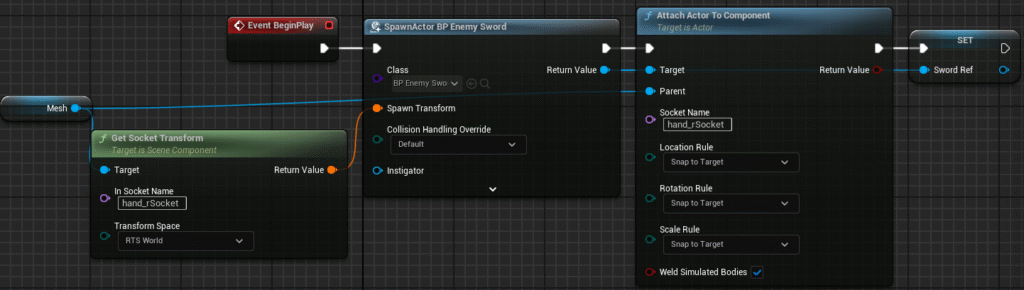
This is the first and simplest change to the enemy starting with using the same logic the player class uses to attach an enemy sword to the enemy on the begin play of the enemy.
https://blueprintue.com/blueprint/_urtdcxd
This is the only other place with changes in the enemy actor with it now having on success of the AI move to the player character acceptance radius it does once a call to an attack function which plays the enemy swing sword animation montage on complete of that it delays a second and then resets the do once.
Link to the project on Github: GeorgeBGames/FinalProject
Link for specifically commit history: Commits · GeorgeBGames/FinalProject